

MDZip for MarkItDown lets you...
- Turn a Word or PowerPoint file into Markdown without losing its pictures: they go into one MDZip (
.mdz) file with the text - Read
.mdzfiles with Microsoft's MarkItDown, the converter made for handing documents to AI tools - Do both from the command line or from your own Python code
MarkItDown turns Word, PowerPoint, PDF, web pages and more into Markdown, mostly to hand documents to AI assistants and language models. It's free, open source and runs on your own computer. This plugin adds .mdz in both directions.
Install
You need Python 3.10 or later. Then, in a terminal:
pip install "markitdown-mdzip[docx,pptx]"That installs MarkItDown, its Word and PowerPoint support, and the plugin. To read PDFs too, use [docx,pptx,pdf]. It works on Windows, macOS and Linux.
Word and PowerPoint to .mdz
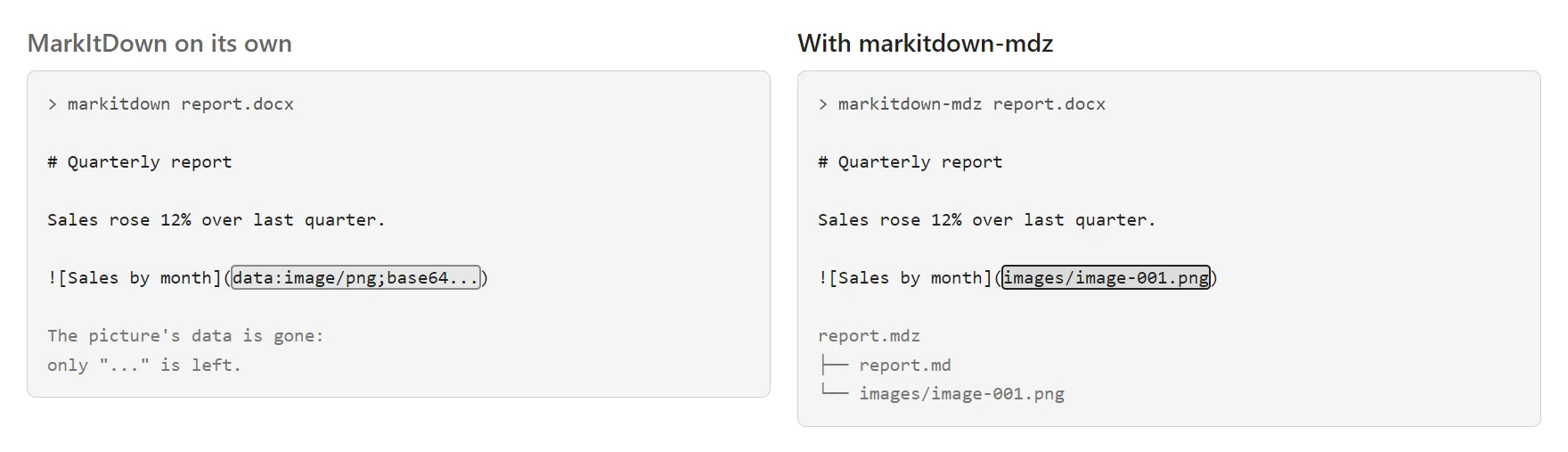
When MarkItDown converts a Word or PowerPoint file, the pictures are lost: only a placeholder is left where each one was. The markitdown-mdz command keeps them:
markitdown-mdz report.docx                 # writes report.mdz
markitdown-mdz slides.pptx -o deck.mdz
markitdown-mdz page.html --title "Trip report"
You get one .mdz file holding the Markdown and every picture, each saved as its own file under images/. A picture used twice is stored once. The title comes from the document.
It works for anything MarkItDown reads. Pictures come through from Word, PowerPoint and web pages with built-in pictures. PDFs come through as text only, because MarkItDown's PDF reader doesn't extract pictures.
Open the result in MDZip Studio, the VS Code or Obsidian plugins, or the web editor, or hand it to an AI assistant as one file.
.mdz to Markdown
MarkItDown leaves plugins off unless you ask, so add --use-plugins:
markitdown --use-plugins guide.mdz- A normal
.mdzgives you its main document. - An
.mdzthat holds several separate documents (a "project".mdz) gives you all of them, the main one first, each starting with a comment naming its file. - The title comes from the
.mdz.
Without the plugin, MarkItDown treats an .mdz as an ordinary ZIP file and lists every file in it, the manifest included.
In Python
from markitdown import MarkItDown
from markitdown_mdzip import convert_to_mdz

# .mdz to Markdown
md = MarkItDown(enable_plugins=True)
print(md.convert("guide.mdz").markdown)

# Word to .mdz, pictures included
convert_to_mdz("report.docx").save("report.mdz")
keep_data_uris=True builds the pictures into the Markdown when you convert an .mdz, so the text stands alone. The README lists every option.
Good to know
- It needs Python 3.10 or later and MarkItDown 0.1 or later. It's tested with MarkItDown 0.1.9 on Windows, macOS and Linux.
- PDFs give text only, as described above.
- An
.mdzthat isn't valid, or that doesn't say which document comes first, is left to MarkItDown's ordinary ZIP handling instead of being guessed at. - It reads and writes
.mdzwithmdzip-core, the Python MDZip library, which pip installs with it.
More
- On PyPI
- Releases, source and issues on GitHub
- Test script: try it step by step and tell us how it went
- Pandoc converter: Word, EPUB, web pages and PDF from
.mdz, and back - Other MDZip tools
This page renders from markitdown.mdz (MDZip, ~43 KB, updated 2026-11-18) — one self-contained file. Download it, open it in the web editor, or read how these pages are made. Built with @mdzip/renderer.